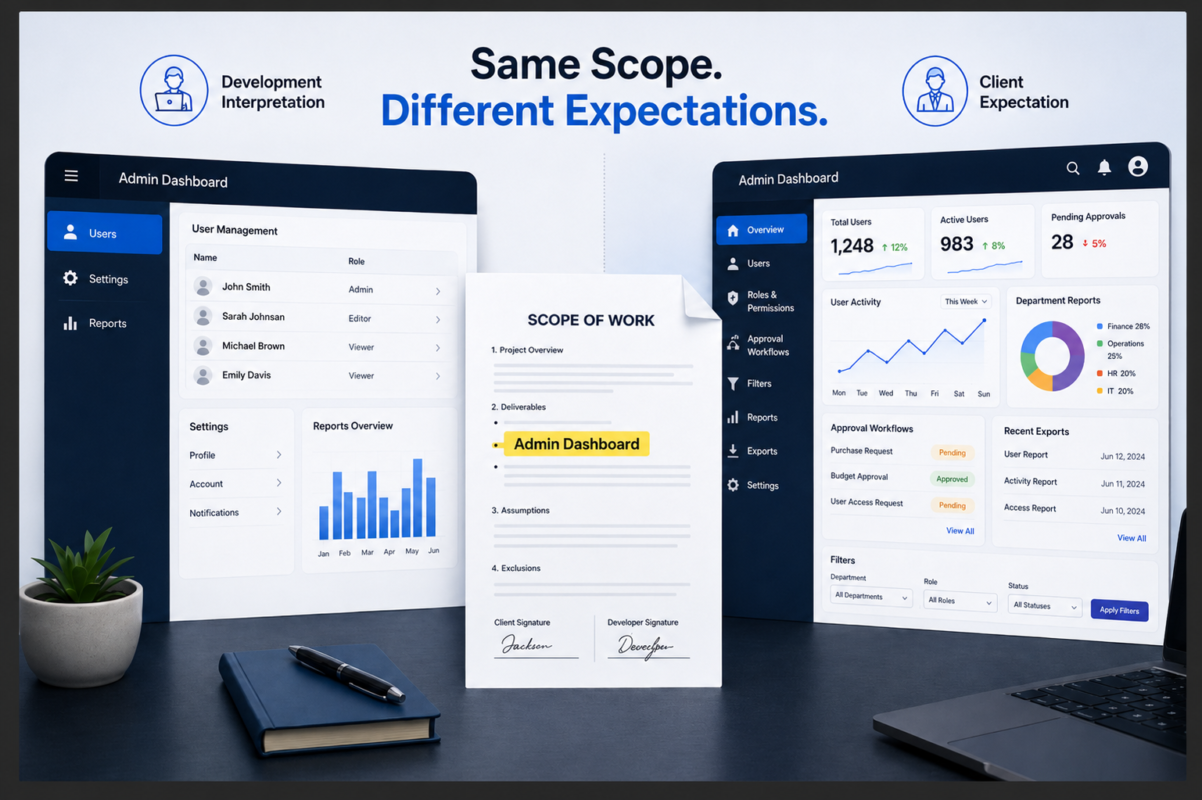
The approved Scope of Work included one line: “Admin dashboard.”
The development team understood that to mean user management, account settings, and basic reporting. The client expected role-based permissions, approval workflows, advanced filters, exports, and separate reports for each department.
Both sides approved the same words, but they were picturing different products.
The problem was not the dashboard. The scope had never explained what “dashboard” actually meant.
A useful software Scope of Work, or SOW, does more than list features and place a price beside them. It gives the client and development team a shared understanding of what is included, who is responsible for each part, how the work will be approved, and what happens when the project changes.
Before the first sprint begins, seven areas need to be clear.
1. Define More Than the Feature Name
A few words can hide weeks of development work.
Terms such as “customer portal,” “CRM,” “reporting module,” and “admin dashboard” may sound specific, but each can describe very different levels of functionality.
An admin dashboard might include user accounts, permission levels, filters, exports, reports, approval workflows, or system settings. Unless those expectations are written down, each side may begin the project with a different understanding of what has been priced.
The scope does not need to describe every button before discovery begins. It should, however, explain the main users, workflows, functions, and expected outputs clearly enough for the team to estimate and build the work properly.
The visible screen is only part of the effort. A simple feature may also require database work, integrations, permission rules, error handling, testing, and security controls.
Exclusions matter too.
When data migration, content creation, hosting costs, third-party licenses, app-store submission, or ongoing support are not included, say so directly. Leaving them unmentioned does not prevent a client from assuming they are part of the project.
2. Agree on What “Finished” Means
The word “finished” creates problems when nobody has agreed on how the work will be tested.
A development team may believe a feature is complete because it works technically. The client may still believe important behavior is missing. Without clear acceptance conditions, that disagreement begins after time and budget have already been spent.
Instead of writing:
The system will include customer search.
A clearer requirement would be:
Authorized users can search for customers by name, email address, account number, and status. Search results will display matching records and allow the user to open the selected customer profile.
The developer now has a testable requirement, and the client has a clear basis for approval.
Acceptance criteria apply to a specific feature. A broader Definition of Done may require testing, code review, documentation, deployment readiness, and resolution of critical defects before a milestone is complete.
The approval process should also answer a few practical questions:
- Who can approve the work?
- How long does the client have to review it?
- How should issues be reported?
- How will corrected work be checked?
- When is the milestone formally complete?
Without those rules, feedback can quickly become a disagreement over whether a request is a bug, an included revision, or new scope.
3. Identify What the Client Must Provide
A development team can be ready to work and still miss a deadline because a required client input never arrived.
Consider a project that includes an integration with the client’s existing CRM. The timeline assumes that API credentials and technical documentation will be available before the integration sprint.
Access is delayed for three weeks.
The team cannot connect the systems or test the workflow, and the launch date begins to move. Without that dependency in the SOW, the delay may look like a delivery failure. When the responsibility and timing are documented, both sides can see what blocked the work and how the schedule should change.
A clear dependency might read:
The client will provide working API credentials and current technical documentation before the integration phase begins.
This connects the dependency to a specific stage of the project and makes the impact of a delay easier to assess.
Other client responsibilities may include providing content, test data, existing system access, third-party licenses, security requirements, timely feedback, and a named decision-maker.
The document should also explain what happens when an input is late. The project may pause, the milestone may move, or the team may continue with another workstream.
4. Match the SOW to the Delivery Model
The document should reflect how the work will actually be delivered.
A fixed-price project usually needs stable requirements, clear exclusions, measurable milestones, and a formal process for work outside the approved scope.
A time-and-materials or sprint-based engagement allows more flexibility, but it still needs structure. The SOW should define the team, rates, sprint length, expected capacity, backlog ownership, and who decides priorities.
Agile delivery does not mean every new request can be added without consequence. The backlog may remain flexible, but time, budget, and team capacity do not.
MVP projects may benefit from a staged approach: scope discovery first, define the initial release carefully, and leave lower-priority work in a future backlog.
Whatever model is selected, the numbers must agree. Phase values, deposits, milestone payments, hourly rates, invoice dates, and the stated total should reconcile before the SOW is signed.
5. Decide How Changes Will Be Handled
Requirements will change. The SOW needs to explain what happens when they do.
A client may ask for “one additional approval step” after seeing the first version of a workflow. On the screen, the request may look small. Behind it, the team may need new permission rules, database fields, notifications, audit records, and more testing.
The request may still be worth making, but its effect should be understood before it is added to the sprint.
A workable change process has four steps:
Record the request
Capture new requirements in one agreed location rather than across meetings, emails, and chat messages.
Assess the impact
Review the effect on design, development, testing, timing, cost, and current priorities.
Make a decision
The client should understand what the change will cost, whether it moves the delivery date, and whether another item must be delayed.
Update the plan
Once approved, document the change through a change order, SOW amendment, revised milestone, or updated backlog.
A new request is easier to manage when it becomes a documented decision rather than an argument over what someone thought was already included.
6. Clarify Ownership and Handover
Paying for development does not automatically settle who owns the code, accounts, documentation, or supporting assets.
The agreement should state what transfers to the client, when the transfer takes effect, and how third-party, open-source, licensed, or pre-existing components are treated.
These terms vary by agreement and jurisdiction, so the final language should be reviewed by qualified legal counsel.
Practical control matters too. Owning the software is not very useful when the client cannot access the repository, hosting account, database, or credentials needed to operate it.
A proper handover may include:
- Source-code repositories
- Hosting and cloud accounts
- Production and staging access
- Database access and backups
- Domains, API keys, and admin credentials
- Design files
- Deployment instructions
- Technical documentation
A simple test is to ask whether a new development team could take over without repeatedly contacting the original provider for missing files, access, or instructions.
When the answer is no, the software may have been delivered, but the handover is not complete.
7. Separate Warranty, Support, and Maintenance
The first production issue is a poor time to discover that the client and development team meant different things by “warranty” and “support.”
A warranty generally covers qualifying defects found after deployment. The agreement should define what counts as a defect, how issues are reported, how long the warranty applies, and what is excluded.
A bug usually means the software is not performing according to an agreed requirement or acceptance criterion.
A new workflow, design change, reporting feature, or integration is different. It may be valuable, but it is normally additional scope.
Support and maintenance also serve different purposes. Support is usually reactive, while maintenance may include software updates, security improvements, monitoring, compatibility work, or changes required by third-party platforms.
Before launch, both sides should agree on what assistance is included, how long it remains included, whether ongoing support requires a retainer, and how future enhancements will be priced.
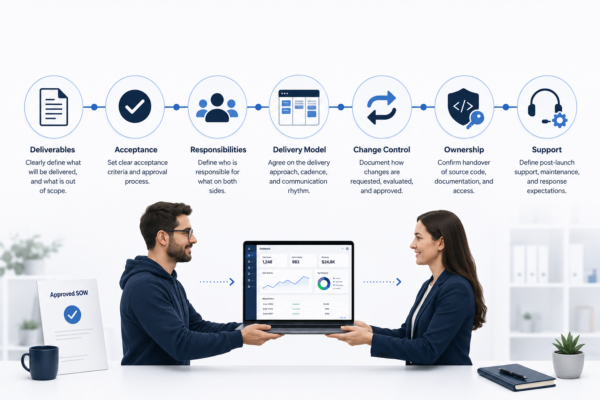
A Software SOW Readiness Check
Applied to the dashboard example from the beginning, these questions would have pushed both sides to define the users, permissions, reports, filters, exports, approval steps, and acceptance conditions before development started.
| Area | Question |
| Deliverables | Do the descriptions explain the main users, workflows, functions, and outputs? |
| Exclusions | Have likely assumptions been addressed directly? |
| Acceptance | Can both sides test whether each deliverable is complete? |
| Responsibilities | Are client inputs, approvals, access, and decision owners assigned? |
| Commercials | Do milestones, fees, payment terms, and the total reconcile? |
| Change control | Is there a written process for reviewing and approving new requests? |
| Ownership | Does the agreement explain what transfers and when? |
| Handover | Will the client receive the code, credentials, documentation, and access needed to operate the product? |
| Post-launch | Are bugs, warranty, support, maintenance, and enhancements treated separately? |
Before the First Sprint
No SOW can predict every technical issue or prevent requirements from changing. Software projects involve discovery, and some decisions will evolve once users begin testing the product.
The document is not meant to freeze the project. It gives both sides a practical way to handle change without reopening every discussion about scope, price, responsibility, and approval.
Before the first sprint begins, the client and development team should be able to answer five questions:
- What are we building, and how will the work be delivered?
- How will each deliverable be tested and approved?
- What must each side provide, and what happens when an input is late?
- How will changes affect priorities, timing, and cost?
- What will the client receive at handover, and what support follows launch?
When those answers are unclear, the project is not ready to begin.
Byte Advisory helps businesses turn product requirements into development scopes that teams can work from, including deliverables, acceptance criteria, responsibilities, change control, and handover planning.
Preparing for a software build? Speak with Byte Advisory before the first sprint begins.
[email protected]
byteadvisory.com/contact/
This article is for general educational purposes and is not legal advice. Contractual, intellectual-property, warranty, and liability provisions should be reviewed by qualified legal counsel.